Side questions, shell and fast reading
Side questions
? asks the session a side question about what is on screen: a card, or the picked session in the sessions view. aq starts a copy of the session (claude --resume --fork-session) and asks the copy. The session itself never sees the question or the answer, so its conversation and context are not changed.
W asks the same kind of copy where the session is up to: a short summary of what is done and what is left.
Shell
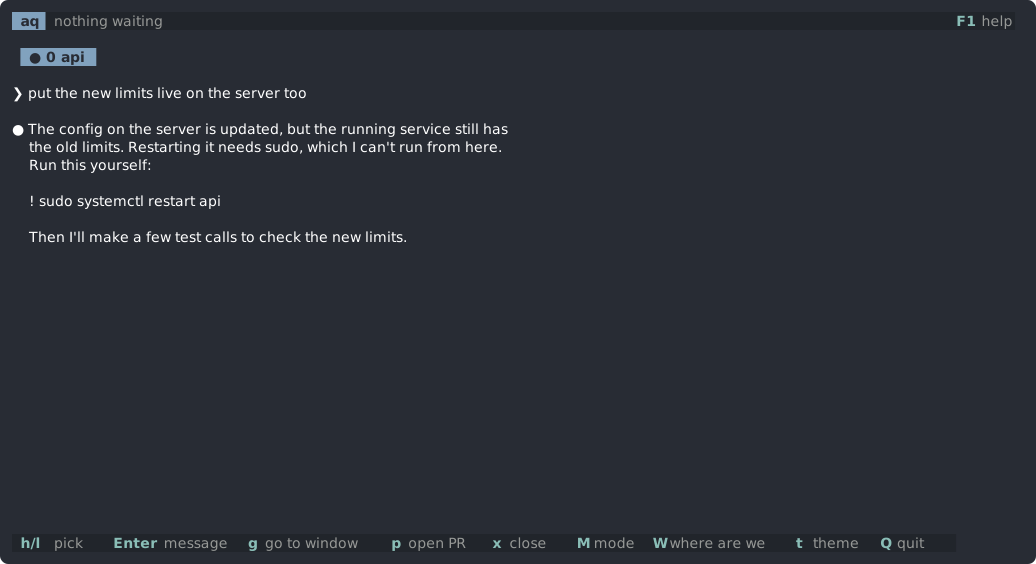
! opens a shell in a tmux popup, in the project's folder. Use it for things Claude cannot run itself: sudo, logins, or commands its permissions block.
The last ! command Claude suggested is copied and, in zsh, already typed in, so Enter runs it. The popup closes when the shell exits.
Fast reading
r shows a text one word at a time, in the same place, so your eyes do not move. It works on question cards, on messages between sessions, and on a session's last reply in the sessions view.
| Key | What it does |
|---|---|
Space | pause or play |
↑ ↓ | faster or slower, by 25 words a minute |
a number, then Enter | set the speed in words a minute |
← → | back or on ten words |
Home | back to the start |
Esc | close |
The speed starts at 350 words a minute, between 100 and 1500, and aq remembers it. Each word's focus letter, a little left of its middle, sits under the guide marks. Words at the end of a sentence or clause, and long words, stay a little longer.
Selecting text
Drag with the mouse to select text; letting go copies it. A double-click copies the word, and a triple-click the whole line.