First run
The tour
The first time aq starts, a tour opens. It takes about four minutes, and most of it is you pressing keys on made-up cards:
- A review: move around, comment, mark a file done, send, approve.
- Step mode: allow one edit, refuse the next with a reason.
- Quiz mode: answer a question, and send the gap the judge found back as a fix.
- Three made-up sessions: pick one, message it, ask where it is up to, start a new one, and move its project through the modes.
Nothing in the tour reaches a real session. F2 runs it again at any time.
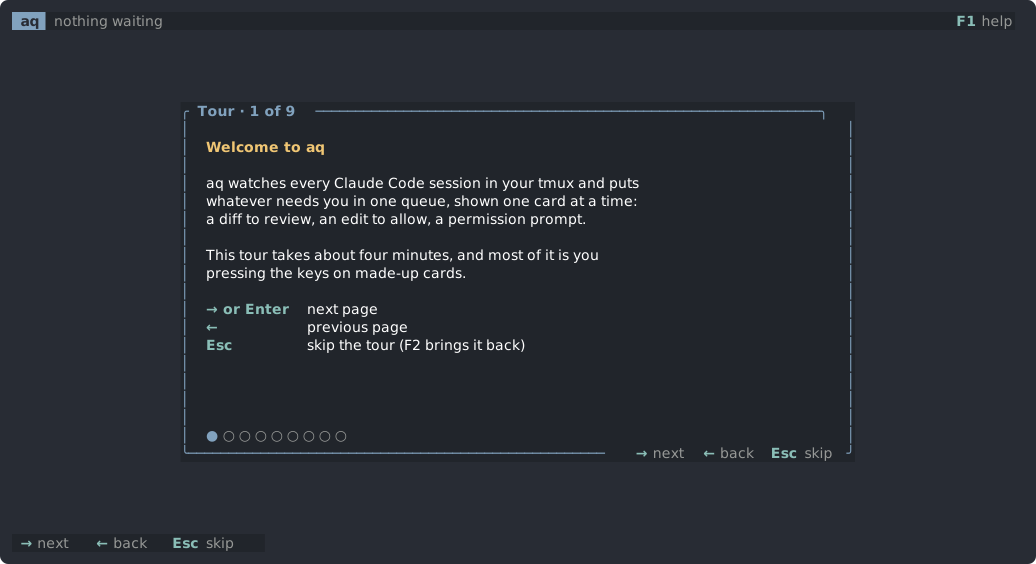
The screen
- The top bar shows how many cards are waiting behind the one on screen, how many questions are stashed (
Slists them), andF3 keys F1 helpon the right. - The middle is the card on screen, or, when nothing is waiting, the sessions view.
- The keys row along the bottom lists the keys for what is on screen. It is hidden until
F3shows it, and aq remembers the choice. While it is hidden, status messages show in the top bar.
Help
F1opens the help page with every key.jandkscroll it,Esccloses it.F3shows or hides the keys row.- Every key has the same list as this site.
Quitting
Q quits. aq saves review rounds, unsent comments and quiz progress, so a restart loses nothing. Cards are not saved. A hook still waiting when aq quits gets no answer: a permission prompt then shows in the session's own window, and an edit waiting in step mode is refused, so Claude tries it again later.